Lefthook
We decided to switch from overcommit to lefthook after this discussion with team. Now if you're interested in having this feature in your local working copy you should follow these instructions.
How to upgrade
- Before merging/pulling run
overcommit --uninstallif you have overcommit installed brew install lefthookgit pull/merge/whateverlefthook install -f
Enjoy.
Configuration
Full reference if you think that some other values can be added please suggest them.
I replicated all configuration files to avoid issues with paths. I fixed some globbing rules in this PR but there are still some issues with global config. In order to avoid issues I configured lefthook to run in all projects (in parallel). Keep in mind that it will skip empty changesets and thus it's pretty fast in every case.
I avoided to use their gem because I don't want to be invasive for the ones that don't need it and even with the gem you still need to run lefthook install to configure it, so a brew install lefthook step is just a one-time thing.
Usage
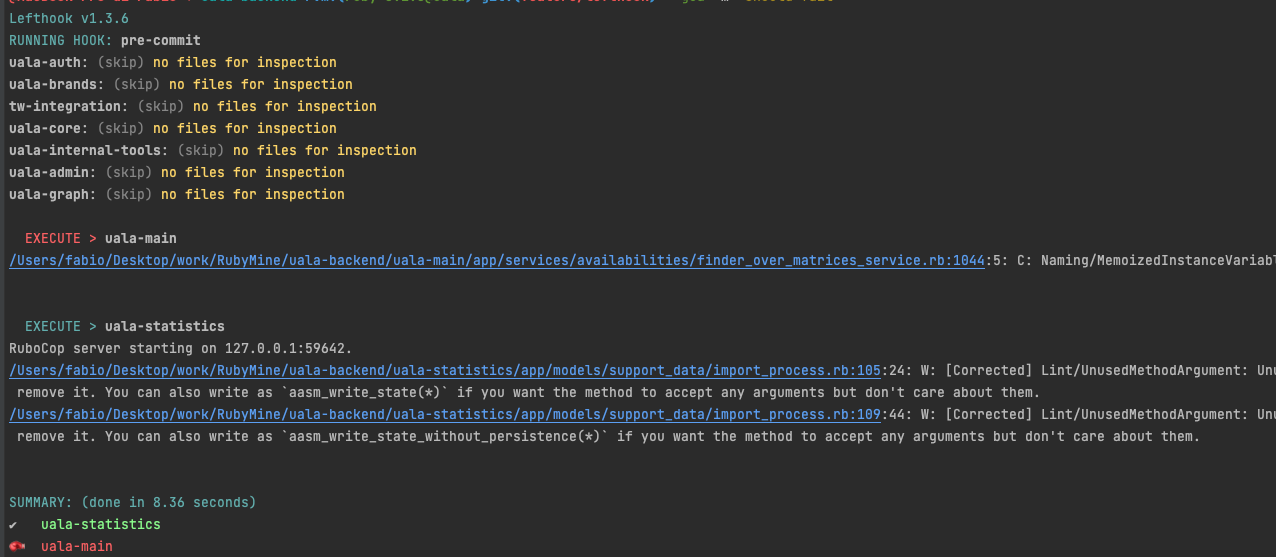
Once installed you can simply forget about it (and about rubocop failures in CI). It will run automatically on every commit and will fix the issues it can fix. If it can't fix the issues it will show you the errors and you can fix them and commit again.
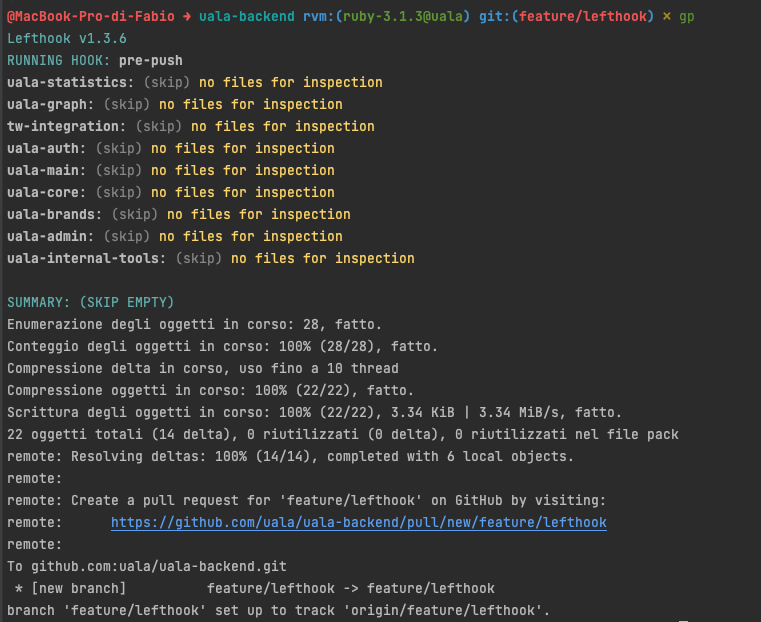
The very same thing will happen on push (but without autocorrection) because there are no files to commit.
This means that any autocorrectable offense will be fixed automatically during the commit and a commit that would fail in CI won't be shipped. This is a huge improvement in my opinion and it will save us a lot of CI (and personal) time.
Local overrides
If you don't like some choices I made you can override them locally by using a lefthook-local.yml file in your repo with your local overrides, e.g. to disable pre-push hook
pre-push:
  skip: true
RVM usage
One of the reaons I moved to it is also that overcommit wasn't working in my IDE because I'm using RVM. lefthook works with RVM out of the box when invoked from shell but it doesn't work when invoked from IDE. I fixed this by adding a lefthook-local.yml (ignored by git) file to the root of the project. This file is merged with the configuration in the repo and will override shared settings. In my case to fix RVM in the IDE I added this:
# Where uala is the gemset I'm using for this project
rc: '~/.rvm/environments/ruby-3.1.3@uala'
Note: If you use this approach or change its content you need to rerun lefthook install -f to apply the changes.
With .rbenv you can make something similar, e.g. (untested)
pre-commit:
  env:
    RBENV_VERSION: 3.1.3
    RBENV_GEMSET: uala
Enable autocorrection
Rubocop autocorrection (-A) is optin, so if you want to enable it you should override configuration using lefthook-local.yml, mine contains:
# In lefthook-local.yml
rc: '.lefthookrc'
and
source ~/.rvm/environments/ruby-3.1.3@uala
export RUBOCOP_OPTS="-A"
(remember to do lefthook install -f)
Demo time
Pre commit hook from CLI (notice that it has fixed 2 correctable issues and so uala-statistics in this example is green)
Pre push hook from CLI
Other useful hooks
On branch switch
Another interesting use case is to run some commands after switching branches, in that case lefthook is used to check if some *Gemfile|*gemspec has changed between branches and if so it runs bundle install to install missing gems. In the same hook, it will also run rubocop --stop-server after bundle because otherwise it's possible that you run rubocop using an outdated version of the gem leading to possible false negatives.
You can extend this hook in your local config, e.g. to run rails db:mgirate if there's a change in db/schema.rb, e.g.
!!!
To run this you'll need at least lefthook 1.3.9 because previous versions does not interpolate hooks arguments in files tag.
!!!
post-checkout:
  piped: true
  commands:
    migrate:
      files: git diff --name-only {1} {2}
      glob: '*schema.rb*'
      run: bundle exec rails db:migrate
Custom tasks
You can exploit lefthook as a file watcher and define custom tasks on changed files. One interesting example is to run specs for modified files only. In this case I configured lefthook to run specs for modified files in parallel. This is useful when you're working on a feature and you want to run specs for the modified files only.
!!! Again lefthook 1.3.9 is needed because previous versions does not read custom tasks from local config !!!
Here's a snippet you can add in your lefthook-local.yml to run specs for modified files only.
# Run modified specs (or newly added ones)
rspec:
  parallel: true
  commands:
    tw-integration:
      files: git ls-files --modified --other --exclude-standard
      glob: '*_spec.rb'
      run: bundle exec rspec {files}
      root: tw-integration
    uala-admin:
      files: git ls-files --modified --other --exclude-standard
      glob: '*_spec.rb'
      run: bundle exec rspec {files}
      root: uala-admin
    uala-auth:
      files: git ls-files --modified --other --exclude-standard
      glob: '*_spec.rb'
      run: bundle exec rspec {files}
      root: uala-auth
    uala-brands:
      files: git ls-files --modified --other --exclude-standard
      glob: '*_spec.rb'
      run: bundle exec rspec {files}
      root: uala-brands
    uala-core:
      files: git ls-files --modified --other --exclude-standard
      glob: '*_spec.rb'
      run: bundle exec rspec {files}
      root: uala-core
    uala-graph:
      files: git ls-files --modified --other --exclude-standard
      glob: '*_spec.rb'
      run: bundle exec rspec {files}
      root: uala-graph
    uala-internal-tools:
      files: git ls-files --modified --other --exclude-standard
      glob: '*_spec.rb'
      run: bundle exec rspec {files}
      root: uala-internal-tools
    uala-main:
      root: uala-main
      files: git ls-files --modified --other --exclude-standard
      glob: '*_spec.rb'
      run: bundle exec rspec {files}
    uala-statistics:
      files: git ls-files --modified --other --exclude-standard
      glob: '*_spec.rb'
      run: bundle exec rspec {files}
      root: uala-statistics
    store-integration:
      files: git ls-files --modified --other --exclude-standard
      glob: '*_spec.rb'
      run: bundle exec rspec {files}
      root: store-integration
Run it with
lefthook run rspec