UALA-main
Setup
The Database configuration is in the .env.development file
the default configuration is
DB_NAME=uala_development
DB_USER=uala
DB_PASS=<redacted>
The default configuration can be overwritten creating .env.development.local file
Run:
cd uala-main
bundle install
sudo su - postgres
createuser uala --superuser
psql
\password uala
# Enter the database user's password found in `.env.development.local` twice
exit
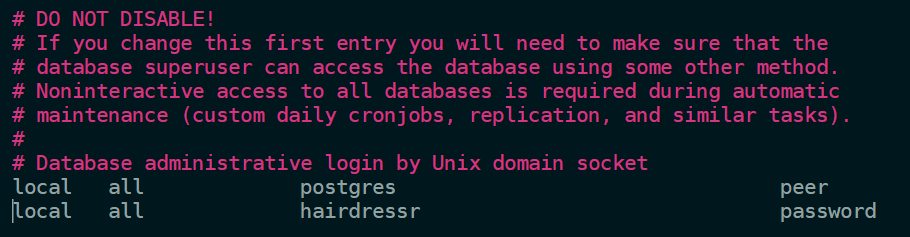
Note for Ubuntu users: Ensure that the uala user uses a 'password' authentication method rather than the default 'peer'
in pg_hba.conf add the line
local all uala password
i.e.
Create the database:
bin/rails db:create
Generate the database using the database seeds
For more information regarding the local dev setup please refer to Initial Setup.
Introduction
The uala-main application was original the monolith application with the full uala's backend, that has been split into multiple applications. For that reason, this application contains lot of logics and models and it's identified as the main backend application (not coincidentally called uala-main...).
It uses the main database, which is the biggest one, and other applications read from it (mainly reads, little amount of writes).
Talking about exposed routes, this application exposes different paths:
/api/internal: used byUala::Intrappsmodule for intra-application communication/api/reserve_with_google: implementation of Reserve with Google endpoints/api/v1: handles B2B controllers/api/v2: handles B2C controllers, first version/api/v3: handles B2C controllers, second version, evolution ofv2
PLEASE NOTE: /api/v1, /api/v2, /api/v3 doesn't properly follow semantic versioning and can cause confusion, refer to the list above to understand who do what.