CD - Continuous Deployment
Test environments (dev4, dev5, devtw, staging) and production now go through the same
underlying pipeline — GitHub Actions builds and pushes an image to ECR, then commits an
image-tag bump to k8s-gitops-twpro, which
ArgoCD syncs to the target cluster. What differs is only how each is triggered:
Solid arrows are the workload path (images/manifests, fully automated end-to-end). The dashed arrows are the secrets path, which no longer runs through this pipeline at all — see Deployment secrets flow for the full detail, and on getting pods to actually pick up a changed secret.
!!!info ArgoCD picks up the gitops commit within seconds The gitops repo's push webhook reaches ArgoCD through a proxy, so ArgoCD notices the commit within seconds; its periodic poll is only the fallback. If an app still shows the old version after a minute, open ArgoCD, select the app(s) you just deployed, and hit Refresh (or Refresh All) — not Sync. Refresh makes ArgoCD re-check the git repo right now; Sync is the separate action that applies a pending diff, which auto-sync already does once ArgoCD has seen the change. Hitting Sync instead of Refresh is a common mix-up here. !!!
!!!info Application secrets are on a separate track This pipeline updates workload images and manifests only. Secret values are set in the AWS console and reach pods through the Secrets Store CSI driver. A changed value never reaches a running pod on its own: restart the Deployments that consume it in ArgoCD, or redeploy — which rolls the whole environment, but only if it produces a genuinely different image tag. See restarting after a change. !!!
Test environments
In order to deploy a development branch on a dedicated test environment (DEV4, DEV5, DEVTW) or staging, use the deploy-to-env.sh script available in the root of the project: ./deploy-to-env.sh {dev4|dev5|devtw|staging}.
It pushes your current branch, then triggers .github/workflows/cd-on-demand.yml (via gh workflow run) targeting that environment with your branch. Requires the GitHub CLI (gh) to be installed and authenticated.
To follow the deploy from the CLI: gh run list --workflow=cd-on-demand.yml --repo treatwell/uala-backend.
Each image is tagged git-<full commit SHA> (release builds also get the version tag), so the running image tells you exactly which commit it was built from. If you're expecting a test environment to contain your latest commit image but it doesn't, check the corresponding job in the workflow run — cd-on-demand.yml deploys every configured subproject in parallel, so it's possible some succeeded while another failed.
Deployments branch
It can happen that multiple development branches need to be tested together in the same test environment: in order to do that, create a new branch in which all development branches are merged, then run deploy-to-env.sh (or gh workflow run cd-on-demand.yml -f environment=<env> -f branch=<your-combined-branch>) from it.
Merging multiple development branches on a single branch can cause conflicts or inconsistencies, so it's better to reset this combined branch after the development branches it contains have been merged to main.
We strongly advise you not to directly commit in these combined branches, since they won't be merged to main and any commit made directly on them will be lost.
Multi-feature deployments branch
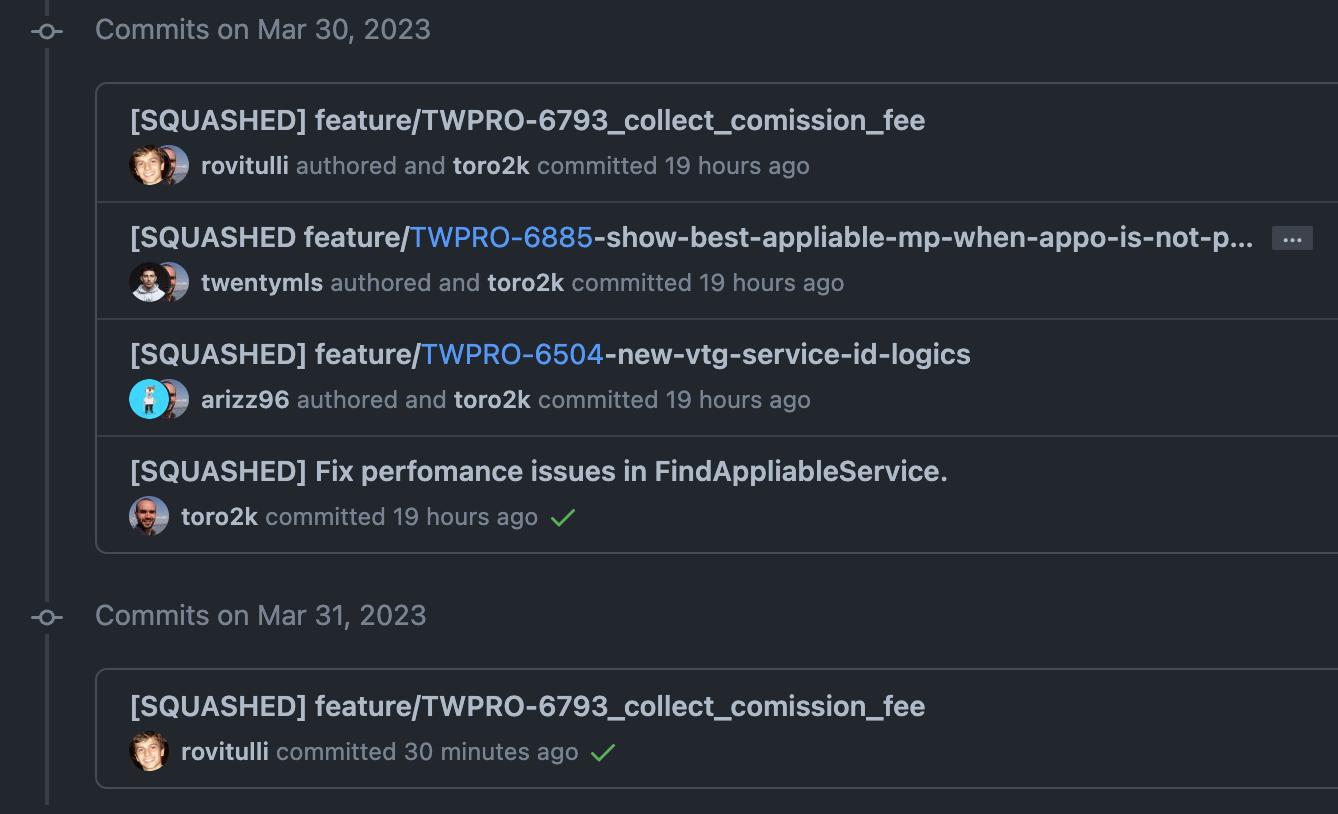
When more than one feature branch needs to be deployed in the same environment, it's possible to use a single combined branch (e.g. cash-dev4 or tw-integration-devtw) and merge changes into it.
To do that, the feature branch must be squashed and merged into the combined branch, using the following syntax: [SQUASHED] branch/your-feature-branch.
When the merged branch changes and a new version needs to be deployed, the previous [SQUASHED] merge commit need to be removed and a new one can then be added.
Database migrations (test environments)
There are no automations on DB migrations, so once the branch has been deployed, you need to manually execute them in that test environment.
Open a shell in the environment's toolbox and run them there — see
Infrastructure for getting kubectl pointed at the cluster:
kubectl -n be-main-env-dev4 exec -ti deploy/toolbox -- bin/rails db:migrate:status
kubectl -n be-main-env-dev4 exec -ti deploy/toolbox -- bin/rails db:migrate
.view-eks is enough on dev-emerald, which aggregates pods/exec into the view role.
Available entry points
https://dev{X}-admin.uala.dev/backend/venuesActiveAdmin serverhttps://dev{x}-api.uala.devAPI server connected to ithttps://dev{x}-twpro.uala.devSaaS client connected to ithttps://dev{x}-www.uala.it/UALA Marketplace- Kubernetes
Production release
!!!warning Troubleshooting In case of any issue during the release process, checkout the troubleshooting wiki page and don't hesitate at all on asking help! Use the #be-saas-releases Slack channel to inform the team, tagging @channel !!!
!!!info Unexpected merge
If main branch contains more than 1 PR, all the authors of merged PRs can follow the release process together. No other special actions are needed, but instead of having 1 PR - 1 author - 1 release - 2 hands/eyes on release process, there will be N PRs - N authors - 1 release - 2N hands/eyes on release process.
!!!
!!!info Team notification There's a dedicated Slack channel #be-saas-releases that must be used for all communication about releases; not only start and end of the release process, but also issues related to the release, blockers, release postponed, etc. That channel is also connected to Datadog issue alerting, posting new issues from the latest release. !!!
!!!info Note on release and tag naming
As of June 24th 2026 the release and tag naming has changed format. The new format is v{YEAH}.{MONTH}-{MINOR} (e.g. v26.06-7), while the old format was {YEAH}.{MONTH}.{MINOR} (e.g. 26.06-6).
The last release using the old format is 26.06-6.
The first release using the new format is v26.06-7.
!!!
Prerequisites
- all necessary PRs are merged to
mainusing squash & merge commit (this is enforced by actual GitHub configuration so it's an easy check); .github/workflows/cd-staging.ymlruns CI and then builds/deploys every subproject to staging on every push tomain— check it succeeded before releasing:- via web: Actions tab, "CD - Staging" workflow — looking for the run on the latest
maincommit - via CLI:
gh run list --repo treatwell/uala-backend --workflow "CD - Staging" --limit 1
- via web: Actions tab, "CD - Staging" workflow — looking for the run on the latest
- when the previous point is completed a draft release is created/refreshed automatically by
.github/workflows/cd-draft-release.yml(calverv{YY}.{MM}-{MICRO}; if the current month's draft already exists it's refreshed in place with the latest merged PRs, otherwiseMICROis bumped).
Steps
- write in #be-saas-releases to stop merging tagging @channel
- start monitoring the process
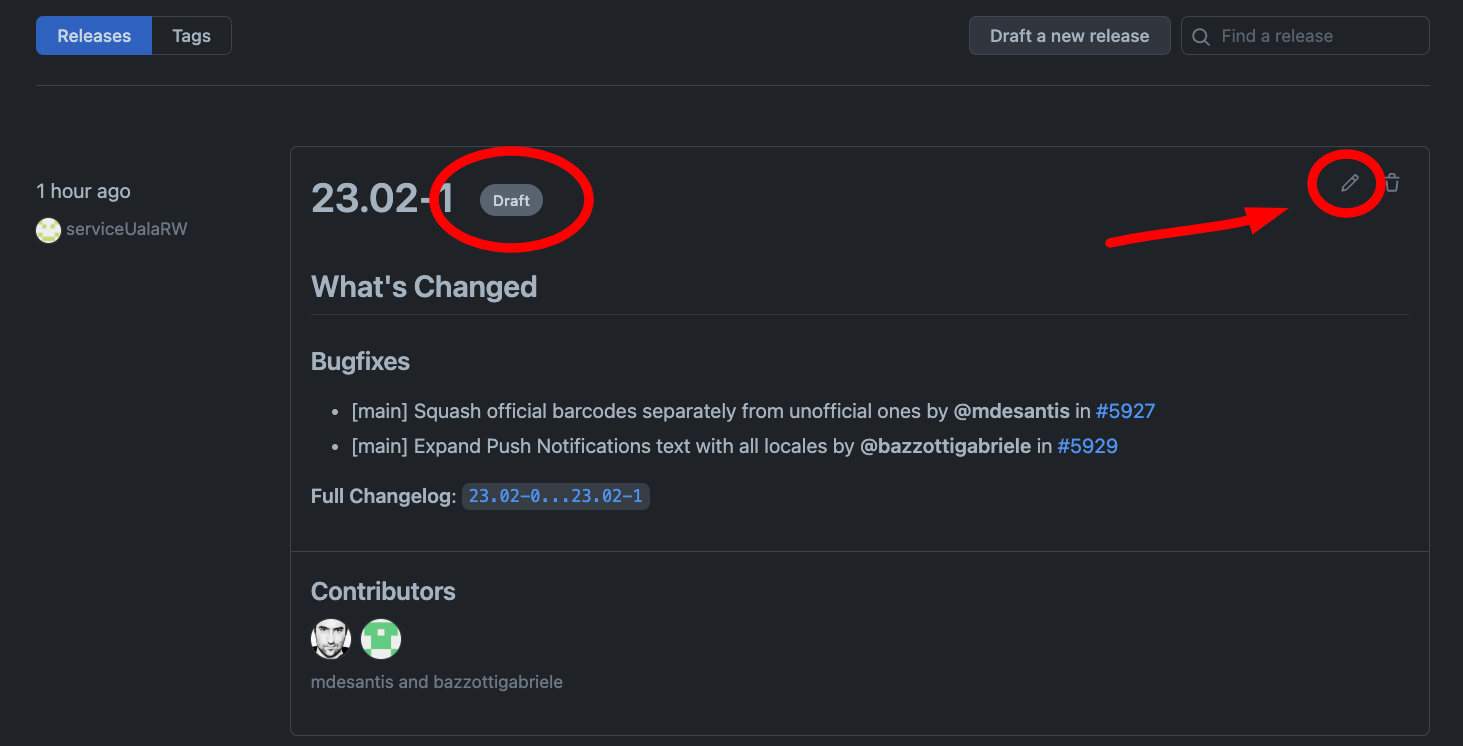
- Open the releases page and edit the latest draft (created/refreshed automatically):
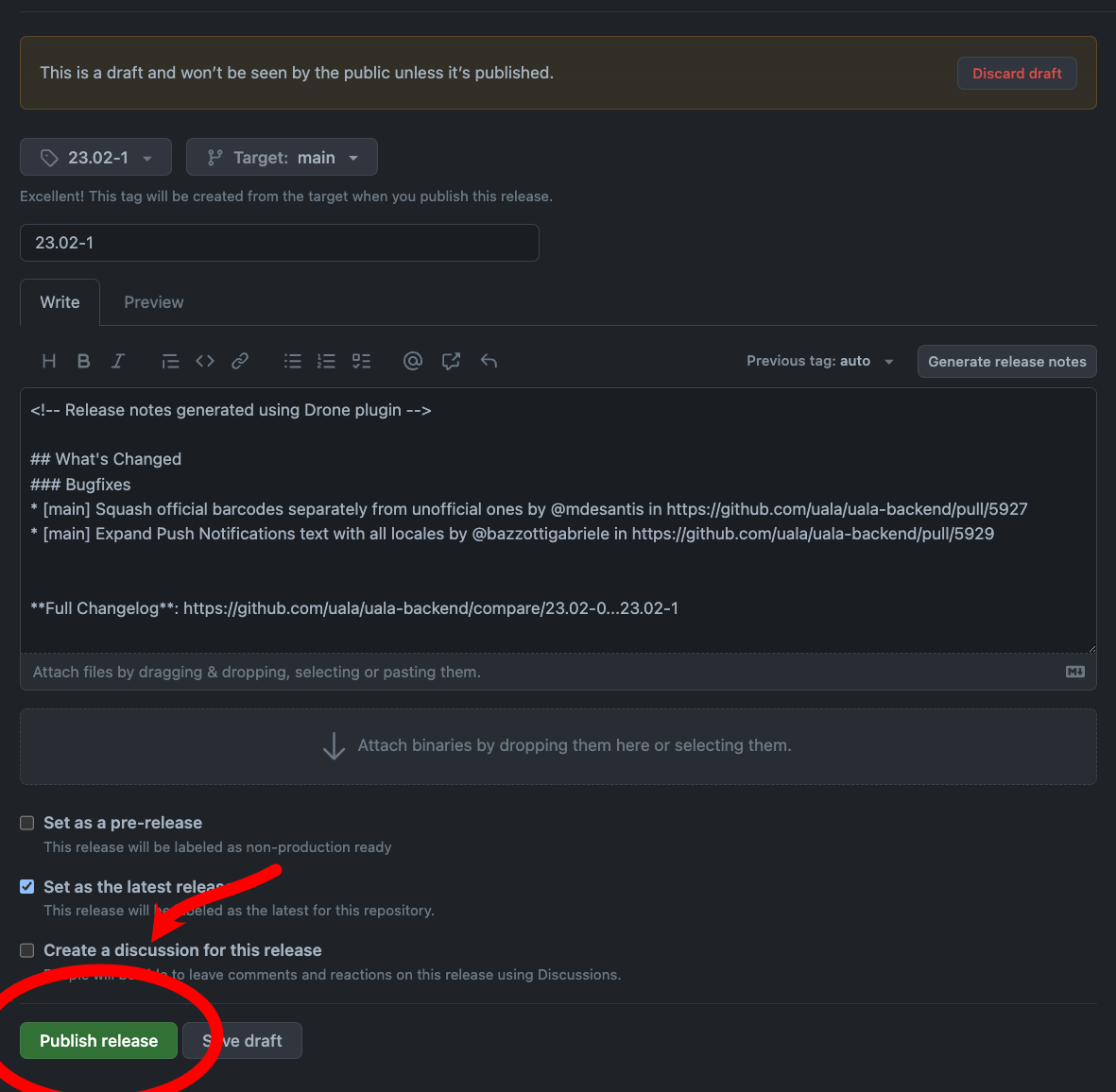
- Publish it:
- Publishing pushes the tag, which triggers
.github/workflows/cd-production.yml— check a run tagged with the release version has started:- if it's red, check the failing job's logs (
gh run view <run-id> --repo treatwell/uala-backend --log-failed) — a transient error (e.g. a gitops push race) can usually just be re-run - if it's green, the gitops commit has landed — ArgoCD picks it up within seconds; if an app still shows the old version, hit Refresh (not Sync) on it in the ArgoCD UI 🚀
- if it's red, check the failing job's logs (
- continue monitoring the process;
- ==- if there are migrations to execute:
a. this check needs revisiting. It used to mean "no in-cluster
database-backup-crondump is running", and the rule of thumb was to migrate between 8:00 and 23:00. Production's database is now Aurora, outside the cluster, and nodatabase-backup-cronexists inbe-main-env-prod— that CronJob survives only in the dev overlays. Confirm with Platform how to check Aurora's backup window before treating this step as satisfied; b. check that changes on database are not huge, because PostgreSQL primary instance sends WAL files to replicas and we cannot afford to lose any of them (statements that update a lot of record must be splitted in batches with a sleeping period); c. pay attention toupdate_allof models that includesHairdressr::Synchable, which will changeupdated_atcolumn and will create load on Venue's synch mechanism; d. check that no vacuum processes are in progress; e. check that thetoolboxpod is up and running with the new image:kubectl -n be-main-env-prod get deploy toolbox -o jsonpath='{.spec.template.spec.containers[0].image}{"\n"}'; f. run the migrations in thetoolboxworkload, opening a shell in the container withkubectlagainst the production cluster (more information here):- check migrations status:
bin/rails db:migrate:status - you should see the ones marked as
downmatching with the ones included in the PRs that are going to be deployed -
- if there is one migration:
bin/rails db:migrate - if there are many migrations: for each migration:
VERSION=<migration version> bin/rails db:migrate:up
- if there is one migration:
- check migrations status:
- ==- if there is any model's
#search_dataor.searchkickmethods change: see Deploy Searchkick index changes
!!!info Understand when deploy has been completed
The ArgoCD UI is the easiest way: the Application goes Progressing while the new pods roll, and back to Healthy when they are all up. From a terminal, kubectl -n be-main-env-prod rollout status deploy/web-b2b does the same for one workload.
Depending on how many replicas and the configuration of pods, update time may vary, but considering a 5 minutes timespan is fair enough.
The autoscaler rolls workloads too, so pods coming and going is not by itself a sign of a deploy. It works only for Sidekiq workers and Puma workers. !!!
cd-production.yml runs one job per subproject (uala-main, uala-admin, uala-auth, uala-brands, uala-graph, uala-doc, uala-internal-tools, uala-statistics, store-integration, tw-integration, connect-integration), all in parallel, each via the shared
treatwell/shared-gh-actions reusable workflow:
- Build — builds and pushes the subproject's Docker image to ECR, tagged with the release version.
- Deploy — commits an image-tag bump to the corresponding overlay in
k8s-gitops-twpro. Because all subprojects push to the same branch in parallel, this step retries with a rebase-and-backoff loop on push conflicts — a normal, expected part of a healthy run, not a sign of trouble by itself. - ArgoCD picks up the gitops commit and syncs the new image to the
prod-pitacluster.
To follow a release from the CLI instead of the Actions web UI:
gh run list --repo treatwell/uala-backend --workflow "CD - Production" --limit 1
gh run watch <run-id> --repo treatwell/uala-backend
Monitoring
Here there is an exhaustive list of tools that can be used to monitor an ongoing release, but also the system status at every moment.
Generally speaking, each spike or persistent red color (where it should be green) is a possible bad symptom and it's worth a check.
These are important things to check during the release process (and in the following ~15 minute time window):
- Sematext dashboard (and this quicker check list)
- Sidekiq metrics for failed jobs
- Datadog to check new Error Tracking issues / error logs
- Slack channels need to be carefully monitored
- Load balancer overview page is a quick overview for web servers updating
Final steps
- write in #be-saas-releases about the succeeded release and the possibility to start merging again on
mainbranch
Hotfix releases
There are situations where an immediate intervent is needed and the standard development flow must be skipped to quickly get to it.
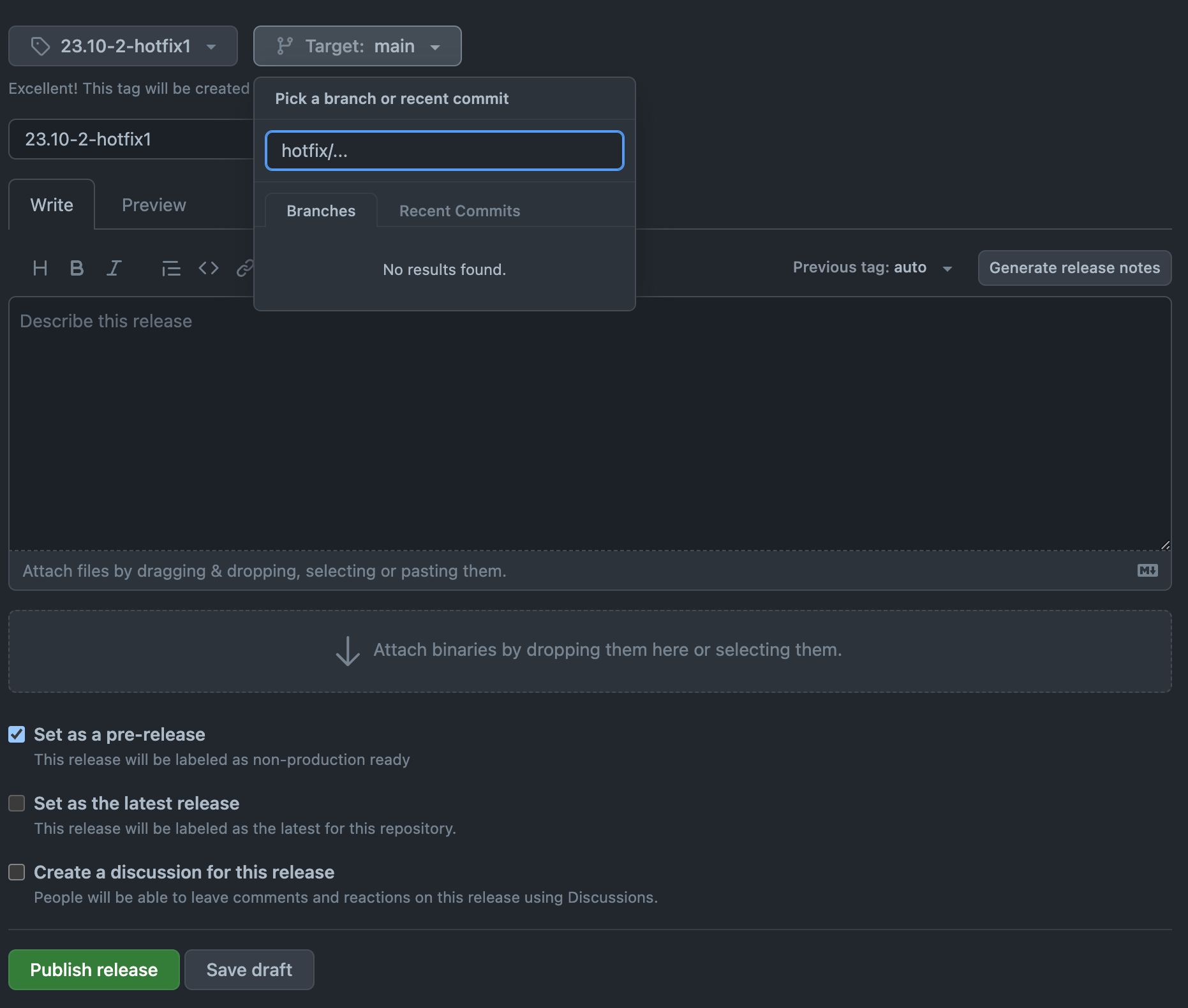
To accomplish this, a branch prefixed with hotfix/... can be created and a pre-release can be created from GitHub. This is exactly the well known release flow, except for type of the release and the need of manually create it from GitHub.
!!!danger Notify the team
If an hotfix release is needed, the whole team need to be instantly notified. This prevent additional merges to go on main branch or new posible releases, but can also provide help to solve the current situation.
!!!
!!!danger Don't forget to merge the hotfix into main
After performing an hotfix, you might really want to create a pull request which merges it into
main branch, otherwise the hotfix will be lost at the next deployment!
!!!
!!!warning When to wait for CI The hotfix release is not dependent on branch CI build to finish, so it can be release at anytime. Depending on the urgency of the fix introduced, you are free to skip waiting for the CI build to finish. !!!
Trigger deployments when there are no code changes
Sometimes, you might want to trigger a deployment when there are no changes to the codebase, for example when changes are made to infrastructure that needs to be deployed. Let's say for example that you've just merged a PR in the k8s-gitops-twpro repository.
!!!info Changing a secret value is one of these cases
A value changed in Secrets Manager reaches no running pod until it restarts. If one namespace reads it, restart those Deployments from ArgoCD; if it is a shared/ secret, a redeploy here is the quicker way to roll them all — see restarting after a change.
!!!
You can trigger a deployment creating a GitHub release manually:
- In the "Choose tag" field, name the release after the previous one, but incrementing the minor version. For example, if the previous one is
v23.10-2, you can name itv23.10-3. - Leave the "Target branch" field as
main. - Enter the same text you used for the tag name in the "Release title" field.
- Populate the release notes properly, possibly add a link to the infrastructure changes that are going to be deployed.
- Finally, click the "Publish release" button.
This triggers cd-production.yml the same as a normal release.
Naming
!!!info Release name and tag name The naming convention applies both to "Release title" and "tag". !!!
The pre-release naming convention follows similar rules as the standard release, but a -hotfix{n} (where n is a number and it starts from 0) is postfixed to the current deployed release.
For example, if the current release is v23.10-2, if a hotfix release is needed, it will be called v23.10-2-hotfix0. In the case another hotfix release is needed, it will be named v23.10-2-hotfix1, and so on.
Release notes
In pre-release, release notes can be empty since the idea is to have a quick tool for intervention and it's meant not to persist in production environment for a long time. Also, changes contained in it might not be finalized and can be different in the official release later on.
Video Tutorial
These are videos of the whole process, different specific cases are shown.