cancellation-protection
Cancellation protection is a feature of our SaaS that allows salon owners to protect from missed appointments. When enabled a salon owner can require a credit card guarantee for an appointment. If the appointment is missed the salon owner can charge the credit card for the missed appointment with a fee that they set at charge time.
In order to have a salon being able to configure cancellation protection for a any given appointment in the future. In order to use the customer driven flow, described below, the appointment must be at least 24 hours in the future.
The cancellation protection flow can be triggered with two different flows:
- Customer driven
- Salon driven
Both flows are initiated by a salon owner that want to protect a group of appointments (identified by a booking_token) for the same customer on the same day. They can do that by clicking the shield icon in the appointment modal (under customer email field).
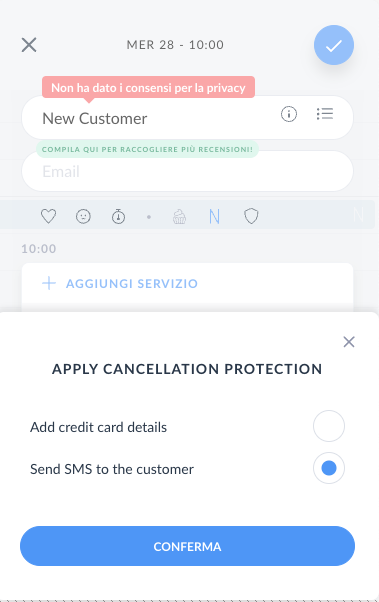
In the first flow the salon configure cancellation protection by sending an SMS to the customer that contains a link. The customer will follow the link and fill in its credit card details, possibly after a 3D Secure verification phase.
In the second flow the salon directly enter credit card detail for the customer in the appointment modal.
In both cases if the card is valid and can be configured for future (off-sessions) payments the setup phase is done. Keep in mind that this process may trigger an additional verification phase from Stripe known as 3D Secure. If the card is not valid or cannot be configured for future payments the salon owner will be notified on screen and the process will be aborted.
When the process is completed protected appointments are indicated in the agenda view with a shield icon.
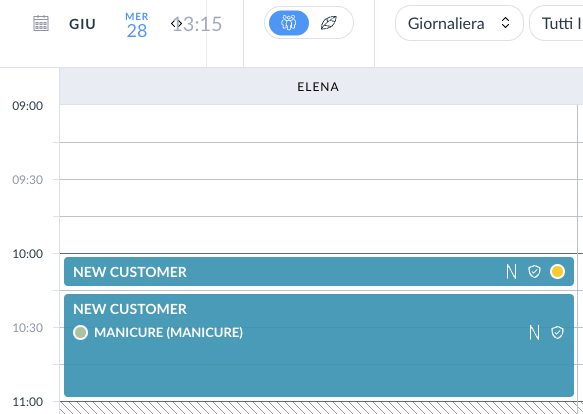
If an appointment is confirmed (either manually or automatically) we remove the cancellation protection from the appointment and the shield icon will disappear.
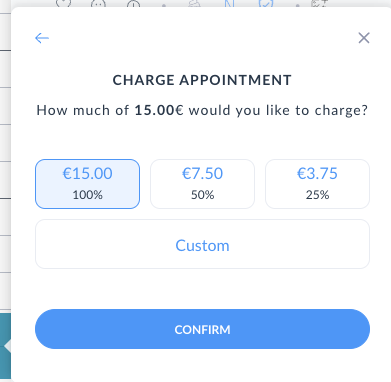
When the day of the appointment comes the salon owner can check-in the customer as usual. If the customer is a no-show the salon owner can charge the credit card for the missed appointment with a fee that they set at charge time. We offers 3 predefined choices for the charge (100%, 50% and 25% of the appointment value) but the salon owner can also enter a custom amount, never greater than the appointment price.
The state of CPs is available in the section "Daily overview > Cancellations and No-Shows" of the SaaS.
When the charge is requested we will create an off-session transaction in Stripe and we will charge the requested amount to the customer credit card. If the charge is successful we will create an OnlineCheckout for the transaction. Optionally a regular Checkout can be issued as receipt for the customer by navigating to "Daily Overview > Cancellations and No-Shows" and clicking on the "Issue receipt" button.

State Machine Diagram
The following diagram represents the state machine of the cancellation protection process.
Essentially a cancellation protection starts in not_configured state and then according to the flow it can go in pending, i.e. awaiting for SMS confirmation, or confirmed when card is entered in the direct flow. Upon SMS confirmation the state will move to confirmed and the salon owner can request a charge.
At this stage there's always a credit card attached to the record and it can be charged at any time.
On appointment miss (/api/v1/venues/:venue_id/customers/:id/miss?date=XXX endpoint) the salon can request charge for the missed appointment, providing a charge_amount_cents parameter, or decline it by skipping that parameter. If declined the state will move to not_charged and the flow completes. If charge is requested the state will move to charge_requested and the charge will be attempted by enqueuing an async Cash::CancellationProtection::ChargeJob that will create an OnlineCheckout and talk to stripe to ask for the charge using the card attached to the cancellation protection.
Upon Stripe webhook receival, if the charge is successful the state will move to charged otherwise to failed. In both cases the flow completes.
Full payment flow
The full payment flow is a complex process that involves many actors and many steps. Here we are going to describe the full flow from the user perspective and from the system perspective.
We start within the assumption that some UI actions added some payable items to a virtual cart (identified by a token) and the user is ready to pay for them.
Cancellation Protection Availability
Cancellation protection is available at appointment level according to the following rules:
- The appointment must be in the future
- There must not be other protected appointments for the same customer on the same day
Technically speaking frontend asks for availability by referring to a single appointment using the /api/v1/venues/:venue_id/appointments/:id/cancellation_protection_availability endpoint and it will return one of this values:
appliable: cancellation protection can be applied to the appointmentnot_appliable: cancellation protection cannot be applied to this appointmentalready_applied: cancellation protection is already applied to another appointment for the same customer on the same day
All the logics that control the availability of cancellation protection are implemented in the CancellationProtection.availability class method.
Possible improvements in the flow for FE
The frontend is currently using the following endpoints and data structures to implement the cancellation protection flow:
CancellationProtectionPresenter::Private::V1/api/v1/venues/:venue_id/cancellation_protections/confirm(among others)
With the state machine refactor (and also the previous one using OnlineCheckout) some fields in the exposed data and the confirm endpoint are not more relevant. Once FE updates its code we can get rid of the endpoint (replaced by stripe webhook), and the following fields in the presenter:
stripe_setup_intent_confirmed: not used anymore in backend codecharge_status: replaced by state machinesetup_status: replaced by state machine
We can consider to keep the latest two to clear express in which phase of the state machine we are and to not have FE implement additional logics (like protected?, applied? etc.)