Marketplace synchronization
This document outlines the data synchronization process between the TWPro platform and Treatwell MP, facilitated through the Main and TW-Integration applications.
Process Scope
The synchronization process is restricted to the Venues that are enabled on the Treatwell marketplace and involves only certain data models or types, which are detailed in subsequent sections.
Synchronization Phases
1. Data Modification by User or Admin
When a Treatwell Pro user or a Treatwell administrator modifies a data entry within the TWPro platform.
2. Kafka Message Generation
The model associated with the modified data generates a Kafka message, containing the data change.
The synchronization process encompasses various data models, each of which includes the Uala::ModelProps::Changeable module and features a line—track_changes full_payload: true—at the beginning of the file, enabling change tracking:
:::code source="../../uala-main/app/models/venue.rb" title="uala-main/app/models/venue.rb" range="267" :::
List of Synchronized Data Models
The following models are currently synchronized:
- Appointment
- BillingCompany
- Franchise
- MarketingPromotion
- Package
- Review
- StaffMemberTreatment
- VenueAvailabilityDynamicContent
- VenueTreatmentGroup
- VenueTreatment
- Venue
3. Message Reception by TW-Integration
TW-Integration application receives the Kafka message via model-specific consumers, each subscribed to their respective Kafka topic.
4. Synchronization Job Execution
The tw-integration executes a synchronization job related to the modified data. If necessary, it also synchronizes data associated with the modified data.
5. Data Transformation
The job transforms the data from the TWPro format to the format required by the Treatwell MP. See transformation for a deeper understanding.
6. API Invocation for Data Posting
Upon completion of the transformation, the job asynchronously invokes a specific API for each modified data, posting the data in JSON format. If the API call fails, the error is logged, and the change is not propagated to the MP. No automatic retries are performed.
Dependency Chains and Indirect Synchronization
Some models are synchronized as a result of indirect changes to an element within its dependency chain. This is particularly evident in the model Package, which has the following dependency chain:
In this context, the touch: true attribute is utilized within associations to ensure that changes to associated or nested models trigger updates to the parent model. For instance, in PackageOption:
belongs_to :package, optional: false, inverse_of: :package_options, touch: true
This configuration implies that any modification to Package Option Resource or Package Option initiates an update of the associated Package.
To fully comprehend which models instigate a synchronization, it is imperative to thoroughly examine the association chains within the models. This helps in identifying both direct and indirect triggers for synchronization, ensuring data consistency across the TWPro platform and Treatwell MP.
Implementation in the tw-integration app
The procedures delineated so far occur within the uala-main application, resulting in the generation of a Kafka message in a model-specific topic. The topic's name mirrors the name of the table associated with the model (source: entity_change_tracker.rb), and the message contains the ID of the record to be synchronized.
Consumers in tw-integration
In tw-integration, a consumer must be created (within app/consumers) for that particular model. This consumer subscribes to the respective topic (e.g., subscribes_to 'packages') and is responsible for determining which job or jobs to execute following a data alteration. For instance, if there is a modification in Package, the Single::PackageServiceJob is executed, which updates the package data. Additionally, Single::ServiceMenuJob is executed to update the service menu, which may indirectly change due to alterations in package data.
Jobs in tw-integration
Let's delve into the jobs, where arguably the most intricate part of the process transpires.
A job typically:
-
Selects Data for Synchronization: In the case of a package, this is relatively straightforward. However, for other data types like availabilities, it might morph into a significantly complex operation. The job identifies the data requiring synchronization. While simplistic for models like
Package, this can escalate in complexity for others like availabilities, requiring thorough, meticulous selection logic. -
Data Transformation: The data is converted from the TWPro format to the MarketPlace format. This step is perhaps the most complex and, occasionally, the most error-prone stage in the entire process. The data, once selected, undergoes transformation from the TWPro format to the MarketPlace format. This step is imperative to ensure data consistency and accuracy across platforms, yet it can be notably complex and is often where most synchronization errors or discrepancies emerge.
-
Data Transmission: The transformed data is sent to a specific API on the MarketPlace. This step is crucial to propagate the changes from the TWPro platform to the Treatwell MP, thereby ensuring synchronized, accurate data representation across both platforms.
In the complex labyrinth of data synchronization, each step is pivotal, ensuring that accurate, consistent data is reflected across both the TWPro platform and the Treatwell MP, maintaining integrity and reliability in the data presented to the end-users on the Treatwell Marketplace. This implementation within the tw-integration app, from consumer creation to intricate job execution, orchestrates the seamless, behind-the-scenes synchronization that powers consistent data representation across platforms.
Naming Conventions: Consumers and Jobs
As a general guideline, consumers within TWPro adopt names derived from the TwPro/uala-main models, whereas jobs inherit their names from the corresponding MP models. This naming strategy facilitates clear differentiation and identification of consumers and jobs within the synchronization process, ensuring straightforward navigation and management of the respective components.
Previewing Data Sent to the Marketplace (MP)
Ensuring data integrity and accuracy during synchronization is paramount; thus, previewing data destined for the Marketplace (MP) is a vital step. This can be accomplished via two primary methods, providing flexibility and facilitating the debugging process:
1. Console Preview
All synchronization jobs adhere to the preview method e.g.,
Single::ServiceMenuJob.new.preview(<id>)
This method yields the JSON that would be dispatched to the marketplace, without actually initiating the API call, thereby allowing developers or administrators to validate and scrutinize the data prior to transmission.
2. Utilizing the job_preview Endpoint
To streamline the debugging process and provide clear insights into the exact data being transmitted to the MP, the job_preview endpoint has been established within the Internal::UtilitiesController. It corresponds to the route /tw-integration/internal/job_preview?job=&id=, for example: tw-integration/internal/job_preview?job=service&id=3, where service specifies the job type for preview, and 3 is the record ID.
Currently, previews can be obtained for the following jobs:
mapped_jobs = {
  'service' => 'Single::ServiceJob',
  'service_menu' => 'Single::ServiceMenuJob',
  'venue' => 'Single::VenueEntityJob'
}
However, the list of jobs for which previews can be acquired is easily manageable and can be adjusted within utilities_controller.rb.
These preview methods facilitate an additional layer of validation, ensuring that the data transmitted to the Marketplace is accurate, consistent, and adheres to the expected formats and structures, thereby safeguarding the integrity of the data across both platforms.
Naming Conventions
The following table outlines the naming conventions and basic transformations applied to the data models during the synchronization process between TWPro and Treatwell MP.
| TWPro Model | Treatwell MP Equivalent |
|---|---|
| Appointment (1+) | Booking |
| Billing Company | Supplier |
| Marketing Promotion | BundleService |
| Package | PackageService |
| Venue Treatment Group | Service |
| Package Option | Service Option |
| Venue Treatment | Service Option |
| Staff Member | Employee |
Naming Conventions: Consumers and Jobs
As a general guideline, consumers within TWPro adopt names derived from the TwPro/uala-main models, whereas jobs inherit their names from the corresponding MP models. This naming strategy facilitates clear differentiation and identification of consumers and jobs within the synchronization process, ensuring straightforward navigation and management of the respective components.
Data Transformation: A Deep Dive into Services
The organizational approach towards treatments exhibits notable disparities between TWPro and MP. Marketplace does not recognize concepts like packages, bundled services, and required service chains (a sequence of services connected through the required_venue_treatment_id field). Consequently, the synchronization process must navigate and manage these structural disparities to ensure coherent data representation in the MP.
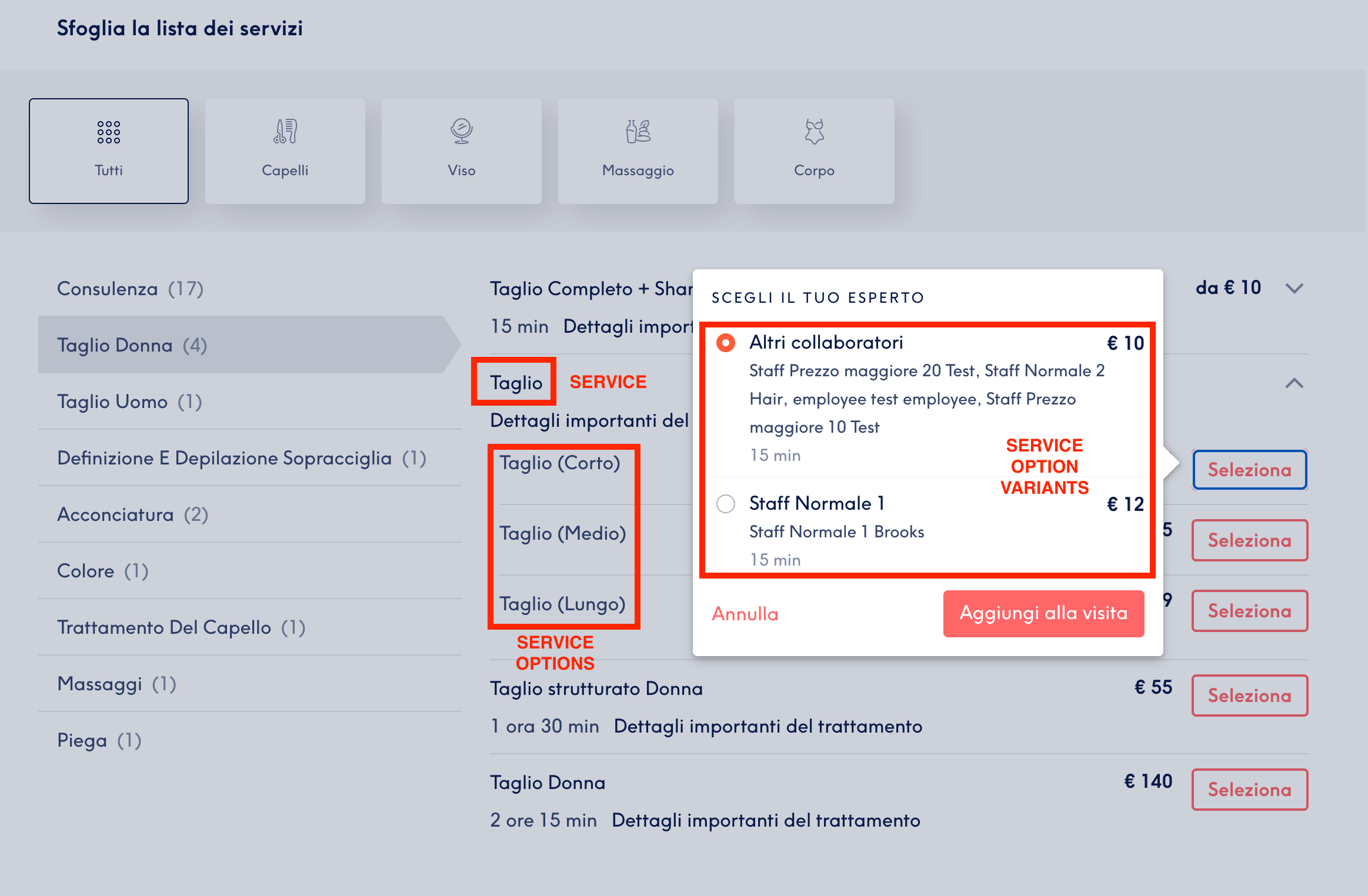
Service
The first level in the service family is the easiest one and consists in 3 type of services.
Simple Service
This directly relates to a VenueTreatmentGroup, and some example of it can be Haircut, Manicure, Epilation.
:::code source="../../tw-integration/app/entities/service.rb" title="tw-integration/app/entities/service.rb" range="85-90" :::
Bundle Service
There's a MarketingPromotion type that is bundle_discount that is suitable for marketplace usage since it contains multiple VenueTreatments at a fixed price.
:::code source="../../tw-integration/app/entities/bundle_service.rb" title="tw-integration/app/entities/bundle_service.rb" range="8-15" :::
The class inherits from Service overriding some of its methods.
PackageService
As the name suggests, this is linked to Package and represents it in the marketplace. The logic might be similar to BundleService for some aspects, but the Package can have multiple package options involved.
:::code source="../../tw-integration/app/entities/package_service.rb" title="tw-integration/app/entities/package_service.rb" range="8-14" :::
The class inherits from Service overriding some of its methods.
ServiceOption
This is the second level of Service structure and the most complex one, given the differences between TWPro and TW MP. The Service#venue_treatments_chains (and similarly venue_treatment_ids_chains) method provides the list of set(s) of VenueTreatments, and each of them results in a ServiceOption.
!!! Please note
The ServiceOption is the bookable entity for TW MP, there are no entities above or below it that can result into a booking. The duration and price attributes are available at this level only.
!!!
:::code source="../../tw-integration/app/entities/service_option.rb" title="tw-integration/app/entities/service_option.rb" range="149-159" :::
To build ServiceOptions from venue_treatments_chains, its data_from_venue_treatments_data method is called, and many data transformation happen there.
==- The method is well documented with examples as well: :::code source="../../tw-integration/app/entities/service_option.rb" title="tw-integration/app/entities/service_option.rb" range="10-146" :::
ServiceOption variant
This is the lower level available on the TW MP, used to have a better UI when there are variations of the same ServiceOption, such as different employees, different pricing levels, and so on.
The ServiceOption#data_from_venue_treatments_data method is responsible of populating the variant_name field.
Keep in mind that this is purely used by the TW MP UI, the variant is a ServiceOption itself, with its unique ID, that shares the same name with other ServiceOption but variantName differs.
Error Handling and Logging
- All errors encountered during the synchronization process, especially during the API call phase, are logged for troubleshooting and audit purposes.
- No automatic retry mechanism is implemented. Manual intervention is required to investigate and rectify issues before attempting synchronization again.